Flags & comments
What flags are for
A flag marks one posting as worth a second look. Two things produce them:
- statycs, from the automatic checks — a finding.
- A person, by marking a row by hand — a question.
Both land in the same place: Analysis → Entries → Flagged. A flag never changes the data, and everyone who can see the posting can see the flag on it — a question addressed to a colleague that only you can read is not a question.
TL;DR
Right-click a posting → Flag for review. A comment is optional and one click is enough. Close a machine finding by dismissing it, close a colleague’s question by resolving it — both keep who and when, and both can be undone.
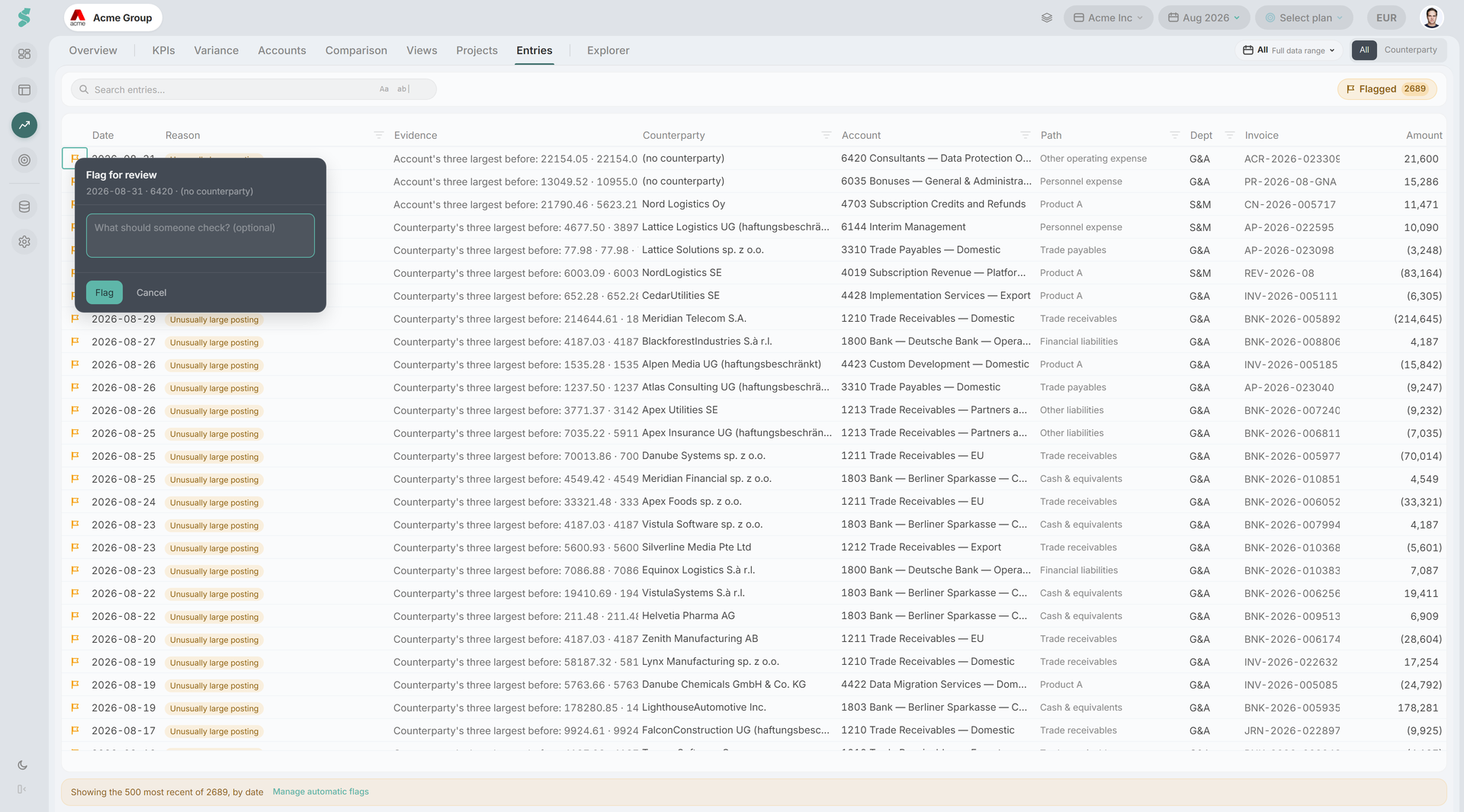
Raising a flag
Right-click any row — in the Entries grid, or in the drill-down drawer over a Financials cell — and choose Flag for review. An anchored popover opens next to the row, never a full modal, because flagging has to cost less than not flagging or the queue stays empty.
- The popover shows the row you are annotating, so there is no doubt which one you caught.
- The comment is optional. “What should someone check?” is a prompt, not a requirement — the minimum viable flag is one click.
- One comment per flag. There is no thread; a conversation on a posting is a separate feature.
A row that already carries someone else’s open question says so — “Someone else has already flagged this row. Resolve their question first.” — rather than stacking a second question on top of the first.
A confidential row shows as Restricted and cannot be flagged. Discussing a posting you may not read is not a way around not reading it.
Comments inherit the row’s sensitivity
A comment is free text and can carry a name onto a row that is not itself sensitive — “Hartmann’s salary looks wrong” written on a bank line. Everyone who can see the posting can read the comment on it. Write accordingly.
Who can flag
Raising a flag needs Editor or Admin. A flag is stored per company and shared with everyone at that company, and writing company-shared data is an Editor-level action — so a Viewer does not see the control rather than being offered one that fails.
Closing a flag
The two outcomes answer two different people:
| Outcome | Answers | Use it when |
|---|---|---|
| Dismiss finding | A machine — “the check is wrong about this row” | statycs flagged it and it is fine |
| Resolve question | A person — “the question you raised has an answer” | A colleague flagged it and you have looked |
statycs picks the right one for you. A row carrying only a machine finding offers Dismiss finding; a row carrying only a hand-raised question offers Resolve question; a row carrying both offers Clear flags with the choice underneath it. You never have to work out which verb applies, and one control can never close a colleague’s open question as a machine false positive.
Both are reversible, and both are attributed
Every closed flag records who and when, and shows it on the row’s tooltip — “Dismissed by Anna Berger · 14 Mar 2026” — beside the reason the row was flagged in the first place. Reopen with Restore finding or Reopen question.
That combination is the point. A duplicate dismissed in error is exactly what an auditor asks about a year later, so a dismissal has to be recoverable and it has to say who made it.
A dismissal does not survive its check being switched off
Confirming a check group as off deletes that group’s findings outright — see Automatic checks. Turning it back on re-runs the check and the findings return, but the dismissals on them do not.
Filtering by reason
The Reason column header filters the flagged view. Alongside the twelve automatic reasons it offers Marked manually, so you can narrow to hand-raised rows alone.
Two things worth knowing about that dropdown:
- It shows a check as off or needs N months as context. It never switches a check on or off — deselecting a reason hides rows from your view only, transiently, and affects nobody else.
- Manage automatic flags in the same dropdown takes an admin to Data → Journal entries → Automatic checks, which is where “stop flagging this for everyone” lives.
The reason filter counts into the shared Clear filters (N) badge with every other column filter, so one click restores the full list. The Flagged pill in the toolbar carries its own count: how many findings are open in the window, which is a different question from how many rows the current query matched.
Related
- Automatic checks — what produces a finding, and how to quiet one
- Journal entries — the Entries grid and its columns
- Counterparties — the counterparty card behind a flagged row
- Roles & permissions — what Viewer, Editor, and Admin can do