Automatic checks
What the checks are for
statycs is not your accounting system — it reads an export of it. That rules out a whole family of checks that only the system of record can make, and it leaves one thing statycs has that the ERP does not: history, plus a counterparty identity that spans companies and years.
Every check here has the same shape — something was stable, and then it wasn’t. None of them changes your data. A check produces a flag on a posting, with the evidence that produced it, and everyone who can see the posting can see the flag.
TL;DR
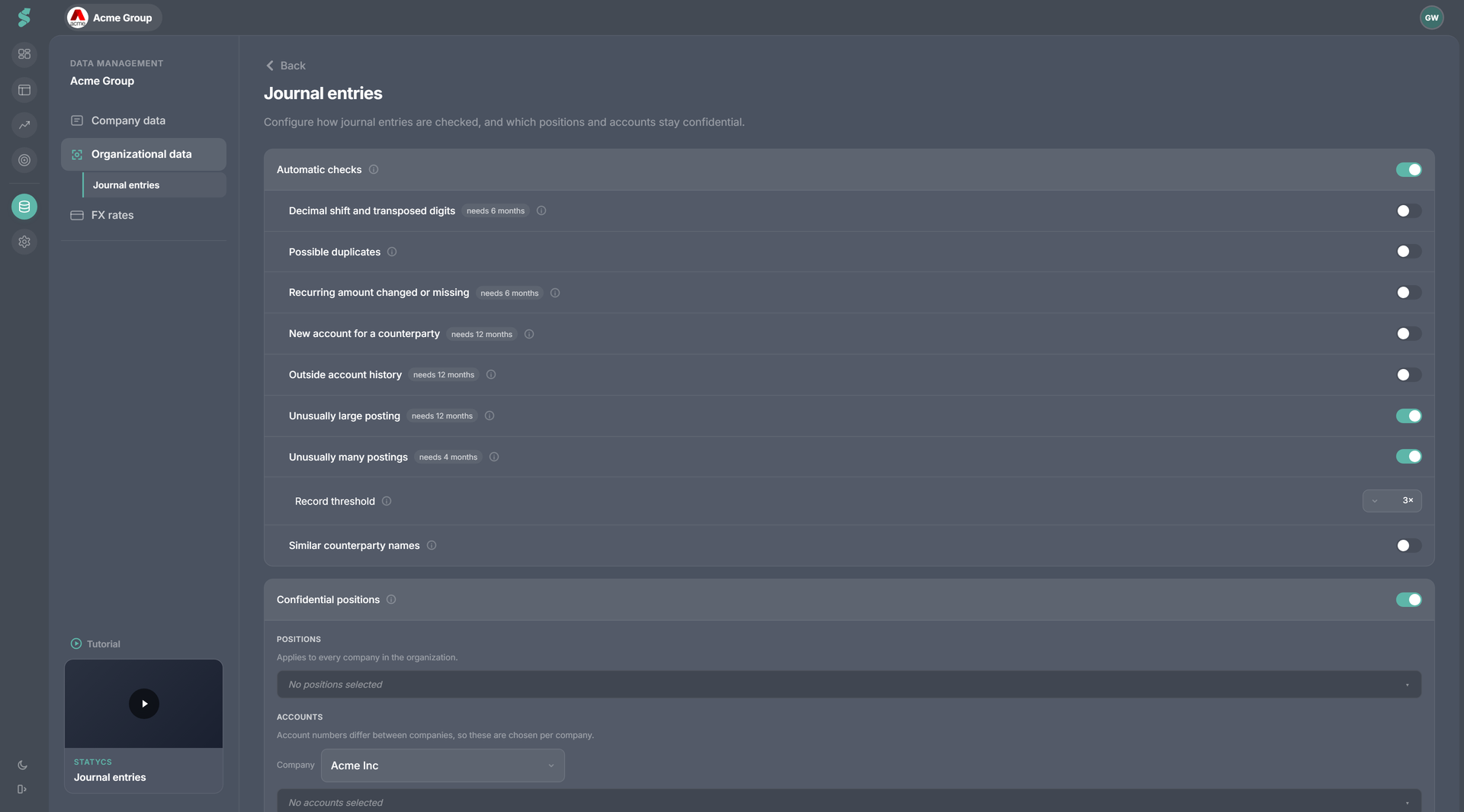
Twelve checks run after each upload. Eight need history, so a young company sees a short list and the footer says how many could run. Manage them in Data → Journal entries → Automatic checks (admin, one setting for the whole organization, applied when you press Confirm changes), and review the findings in Analysis → Entries → Flagged.
The catalogue
The settings screen groups the checks the way you would decide about them, not one switch per reason. Eight switches, twelve reasons.
| Group | Fires when | Needs | Default |
|---|---|---|---|
| Decimal shift and transposed digits | An amount is exactly ×10ᵏ of the counterparty’s recurring amount, or differs from it by a multiple of 9 with the same digit count | 6 months | On |
| Possible duplicates | The same amount and counterparty is booked more than once — on one document number, on one date, or a few days apart | — | On |
| Recurring amount changed or missing | A counterparty that posts a stable amount every month posts a materially different one, or does not post at all | 6 months | On |
| New account for a counterparty | A counterparty posts somewhere it never has | 12 months | Off |
| Outside account history | An account’s monthly total falls outside its own historical range | 12 months | Off |
| Unusually large posting | A single posting reaches the record threshold against the largest this account or counterparty has produced before | 12 months | On |
| Unusually many postings | An account-month has far more postings than it ever has | 4 months | On |
| Similar counterparty names | Two spellings normalize to the same identity (Adobe ×3) | — | On |
The reason filter offers a thirteenth entry, Marked manually — a flag a person raised. It is not a check and no amount of history makes it available. See Flags & comments.
Three notes on the individual checks
Three checks look only at cost accounts. Decimal shift and transposed digits, Recurring amount changed or missing and New account for a counterparty run against cost accounts and nowhere else. Elsewhere a steady monthly amount is simply how the business runs, and a new account is how a business grows — flagging either would be noise by construction.
Decimal shift and transposed digits are one decision. They are the same detection with two arithmetic explanations, which is why they share a switch — almost nobody wants one without the other. They are also the two checks with essentially no false positives, because they are arithmetic rather than judgment.
Similar counterparty names is not an error. It is a housekeeping finding: unmerged spellings split every total this section reports. Act on it in the merge panel rather than by editing the ledger.
Duplicates are counted per entry
Where your file carries a Journal ID, the legs of one booking are recognized as one entry and can never duplicate each other. Recurring identical fees do show up here — that is expected rather than a fault.
Why some checks cannot run yet
Eight of the twelve compare a posting against history that has to exist first. A company three months into statycs genuinely gets a shorter list, and the UI says so rather than letting an empty list read as a bug:
- The dropdown marks an unavailable check needs N months.
- The Entries footer states “X of Y checks can run — the rest need N months of history”.
- On an empty Flagged view, All clear is followed by “X of Y checks ran over this range and found nothing” — but only when some could not run. With every check green the sentence would be noise.
Uploading earlier fiscal years is what shortens that list.
Evidence
Every flag carries the numbers that produced it, in an Evidence column next to the reason. That is deliberate: “3.1× the average” invites an argument, while “eleven months at 1,246.00, this month 12,460.00” does not. Typical evidence reads:
- 11 months at 1,246.00
- 12,460.00 this month against 11 months at 1,246.00
- Monthly for 14 months, nothing this period — expected 1,246.00
- Account’s three largest before: 84,000 · 79,500 · 76,200
- 4 entries, same amount, same date, same counterparty
- 3 entries share document 2026-4471
- Previously only on 6300, 6310
- Also spelled “Adobe Systems Software”
Managing the checks
Data → Journal entries → Automatic checks. Admin only, and the setting applies to every company in the organization — a check that is noise at one company is usually noise at all of them.
Nothing is saved until you confirm
Flipping a switch changes a draft, not the policy. A bar appears — You have unconfirmed changes — with Confirm changes and Discard changes, and the whole page (this card and Confidential positions) shares that one bar.
The reason is that these switches are not a display filter. Confirming a newly enabled group runs that group’s checks across every company’s ledger, and confirming a group as off deletes that group’s findings. That is a real pass over your data in both directions, so it happens once, when you say so, rather than once per click while you are still making up your mind.
Switching a check off discards its findings
Turning a group back on re-runs it and the findings come back, but anything a colleague dismissed on those rows does not survive the round trip. Prefer raising the record threshold over switching a noisy check off.
Master switch
Flag entries automatically turns the whole thing off: the flagged view and its badge disappear. This one is instant in both directions — the master switch hides rather than recomputes, so nothing is re-run when you turn it back on. It never touches a flag a person raised by hand.
Record threshold
The two record checks — Unusually large posting and Unusually many postings — share one control: how far above its own previous high a posting or a month has to go before it is reported. Choose 2× · 3× · 5× · 10×; the default is 3×.
It is a noise valve rather than an off switch. If a lumpy ledger makes those checks chatty, raise the threshold before you disable them. The control greys out when neither record check is running.
Why the bar is the third-largest, not the largest
Both record checks measure against the third-largest prior value, never the maximum. Measuring against the maximum is self-poisoning: one fat-fingered 240,000 raises the bar to 2.4M forever and silently switches the check off with the very finding it correctly made.
A filter is not a setting
Deselecting a reason in the grid’s column header means “hide these rows from my view, now” — it is per user, transient, and available to everyone. Switching a check off on this page means “stop flagging this for everyone” — per organization, persistent, admin only. The two never share a control, and the dropdown shows a check as off or needs N months purely as context. It never changes either.
What statycs deliberately does not check
Several plausible checks were considered and rejected, because each one assumes statycs is the system of record:
| Not checked | Why |
|---|---|
| First-ever appearance of a counterparty | Noise — a growing company adds vendors every month |
| Manual posting | The source field records how a row reached statycs, not how it was posted |
| Posted after the period closed | statycs never learns when your period closed |
| Booking period does not contain the entry date | The period follows the trial balance’s booking period by design, so this would fire on correct data |
| Round amounts | Noise |
| Journal does not balance to zero | The trial balance is derived from the journals, so this checks statycs’ arithmetic against itself |
Related
- Journal entries — the feature, its data, and the Entries tab
- Flags & comments — what to do with a finding
- Counterparties — merging the spellings the name check surfaces
- Notifications — where data-gap alerts appear