Counterparties
What the counterparty view is for
The same postings, asked a different question: not what happened in this account, but what does this party do with us. Suppliers and customers sit in one list, because a journal export has no side — half of every counterparty list is on the other side of the ledger, and nothing in the feed says which.
TL;DR
Switch the Entries tab to Counterparty for one row per party. Double-click a row for a card with twelve months of history and a breakdown by account and department. Where one party appears under several spellings, Merge counterparties folds them together — display only, and always undoable.
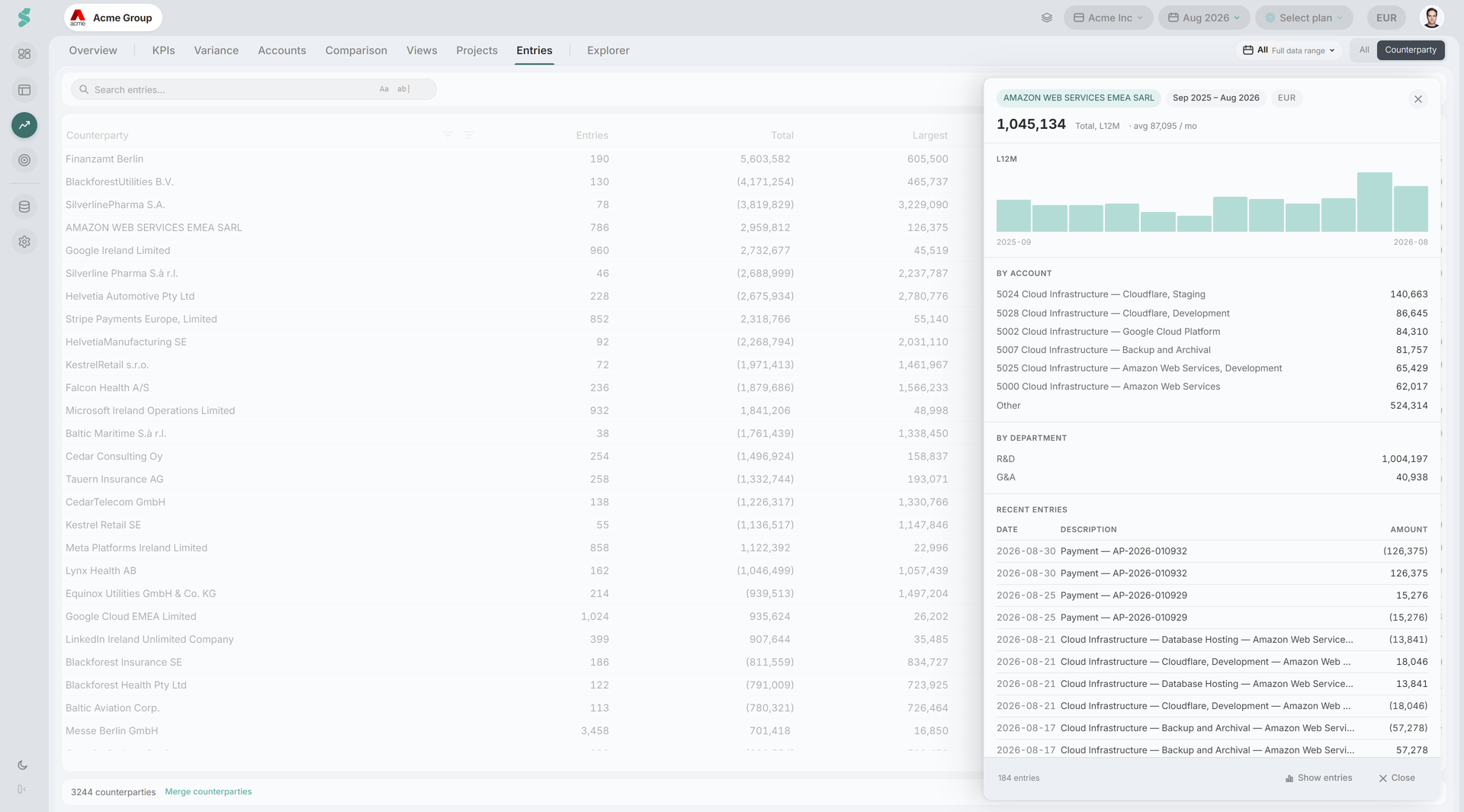
The counterparty list
Analysis → Entries → Counterparty aggregates the current window into one row per party:
| Column | What it shows |
|---|---|
| Counterparty | The name as the feed delivered it, or the merged name where you have merged spellings |
| Entries | Number of postings in the window |
| Total | Net over the window — a signed total, not spend |
| Avg/mo | Net over the last twelve months divided by twelve, not by the number of months with a posting |
| Largest | The largest single posting |
| Last seen | Date of the most recent posting |
The footer reports how many counterparties the window holds. Filters and search work exactly as they do in the All view.
Grouped by the name as written
Until you merge them, three spellings of one vendor are three rows and three totals. That is stated on the card rather than quietly under-reported — see Merging spellings below.
The counterparty card
Double-click a row to open the card in a drawer over the grid. The grid stays where it was, so you can open five parties in a row without losing your place; Esc or a click outside closes it.
The card carries:
- Chips naming the party, the window, the currency, and — where the party posts a stable amount each month — Recurring.
- Total, L12M — net over the last twelve months, with the monthly average beside it.
- A twelve-month chart of monthly net, with a band marking the recurring amount where one exists — so a step away from a stable baseline is visible rather than inferred.
- By account — where this party’s postings land in your chart of accounts.
- By department — the same split by department, when the Departments add-on is active.
- Recent entries — the latest postings, as a shortcut back into the detail.
- Possible duplicates — other parties that look like the same one, each with a Merge into this button.
At the foot, Show entries takes you back to the grid filtered to this party.
Everything on the card is computed over the entries statycs holds for the window; it is a profile of what was found, not a master-data record. The card is profiled by resolved identity, not by one spelling — so a merged party’s card covers every spelling in the group, and it agrees with the row you opened it from.
There is no Supplier or Customer label
A journal export carries a name, not a side. statycs could guess one from the sign of the net, and deliberately does not: a supplier who issues one large credit note is not a customer, and a label that is right most of the time is the kind of thing people quote in a meeting.
Merging spellings
Acme GmbH, ACME Gmbh, and Acme G.m.b.H. are one company and three totals. Merging folds them into one, and the Similar counterparty names check exists to surface the cases worth folding.
Open Merge counterparties from the Counterparty view. The panel has three parts:
- Suggestions — clusters statycs found from name similarity, each showing every spelling with its entry count and total, and marked Strong match or Similar. Pick which spelling survives, then merge the cluster in one action.
- Merge manually — search, tick two or more, and choose the survivor. This is for the pairs no matcher can see: a trading name and a legal name share no letters, and only a person knows they are one company.
- Merged parties — every group that exists, largest first, each with Undo. Expand one to rename it, to return it to the ledger’s own spelling, or to Separate a single member back out of the group.
Counterparty identity is held for the whole organization, not per company, so a group can span companies — which is why each member shows the company it came from, and the only way to tell two identically-named members apart. A member can also be marked Intercompany, flagging a sister company whose postings are internal rather than external spend.
The counts can lag the groupings
Entry counts and totals in this panel come from a materialized roster that catches up on the next upload. Where they predate the latest import the panel says so: the groupings are current, the numbers follow.
What a merge does and does not do
A merge never rewrites a posting. It records that several spellings are one party; the counterparty name the feed delivered stays exactly as it arrived. That is what makes every merge undoable and keeps the ledger faithful to its source.
Because a group holds references rather than an absorbed copy, undoing one is an exact inverse and is never blocked — there is no merge chain to walk back, and separating one member out is the same operation with a shorter list. Renaming a group is reverted by clearing the name, not by restoring a remembered one: the ledger’s own spelling underneath never went anywhere.
Merging is shared with everyone in the organization and needs Editor or Admin, plus unrestricted department access. A user granted only some departments cannot manage counterparties at all, because a counterparty total spans the departments they may not see. Without those rights the panel opens read-only and says so.
Related
- Journal entries — the Entries tab and its columns
- Automatic checks — the similar-names check that finds merge candidates
- Flags & comments — raising a question on a party’s posting
- Departments — what fills the by-department breakdown