Confidential positions
What confidential positions are for
Opening the journal opens everything in it. Personnel costs are the obvious case: the total belongs on the P&L for everyone, and the individual salary lines behind it do not belong on a screen someone is sharing in a meeting.
Confidential positions draws that line. You mark the positions and accounts whose detail should stay closed, and for anyone who is not an admin:
- the drill-down from a Financials cell is refused,
- those postings are absent from the Entries tab,
- a row that would carry one shows as Restricted and cannot be flagged or commented on,
- and an export that would touch them is refused.
The totals do not change. Every figure on the P&L, balance sheet, and cash flow stays exactly as it was, for everyone. Only the entries underneath are hidden, and admins always see everything.
The policy is enforced by the server: for a non-admin, those postings are absent from every journal read rather than fetched and hidden on screen. The refusals in the app are the interface agreeing with the server, not the whole of the protection.
This is still not access control
It keeps salaries off a shared screen. It is not a permissions model and not a substitute for one — someone who should not have the data at all needs a role that does not grant it, not a position marked confidential. Use this for discretion, not for compliance.
Where to set it
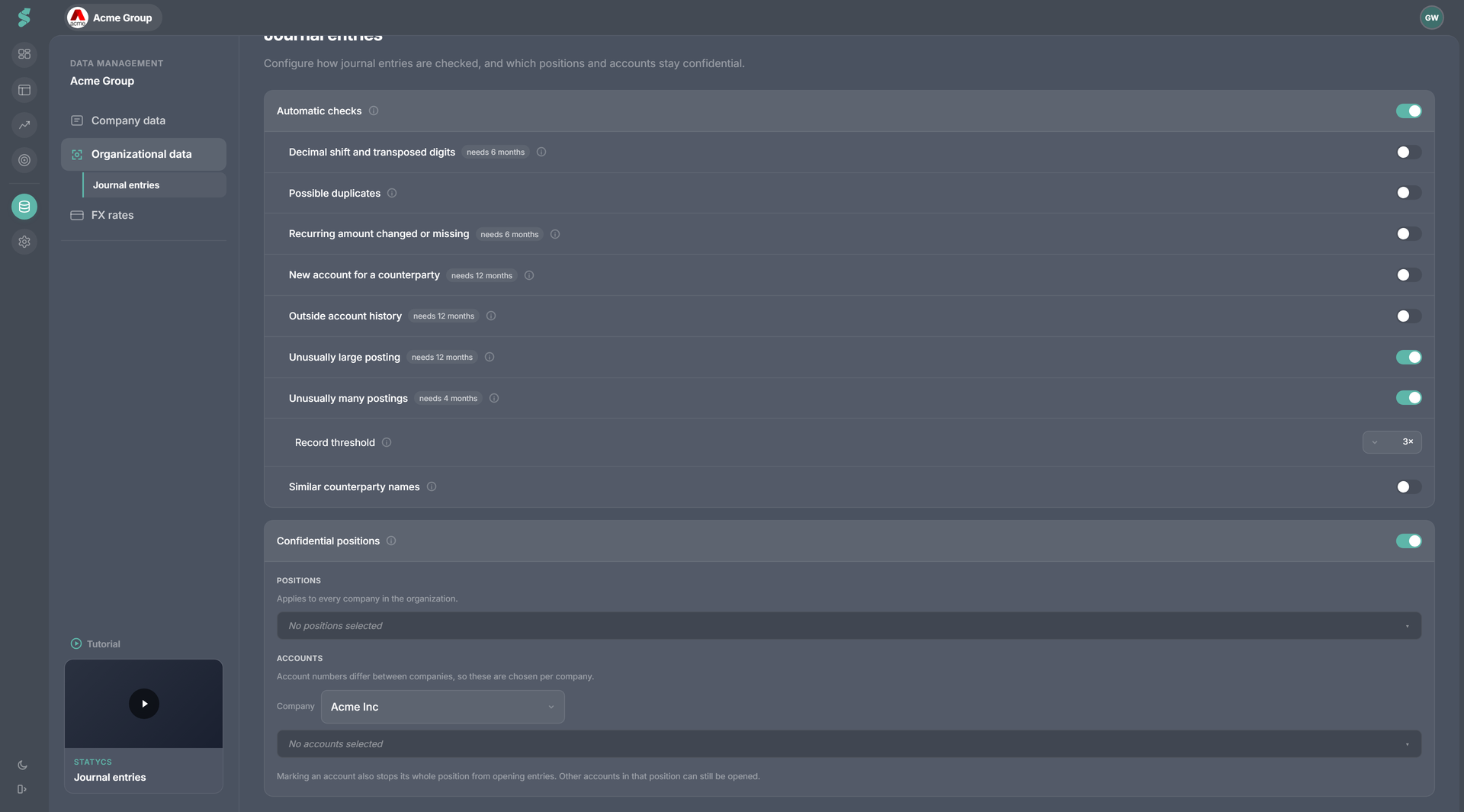
Data → Journal entries → Confidential positions, the second card on that page. Admin only — both to read and to write.
The feature ships off. Nothing is hidden until you turn it on.
Nothing is written as you click. The page’s Confirm changes bar applies this card and Automatic checks together, so a half-made selection never becomes policy.
Two tiers, and why they look different
| Tier | Scope | Why |
|---|---|---|
| Positions | The whole organization | Positions come from your financial statement design, which is org-wide, so you pick them once |
| Accounts | Per company | An account number is a chart-of-accounts number — 6010 is salaries at one company and postage at the next — so this half carries a company selector |
Positions
Pick level-2 positions from your financial statement design. Marking a position closes the entries behind every account underneath it.
When you first switch the feature on, statycs pre-ticks positions whose names look like personnel costs. That is a convenience, not a guarantee — there is no universal identifier for a payroll position, so it is a guess made from the identifiers in your own statement design. The resolved list is shown next to the switch precisely so you can check it before anyone relies on it.
Accounts
Choose one company at a time, then pick account numbers from its chart. Two behaviors are worth knowing:
- Marking an account also stops its whole position from opening entries. Other accounts in that position can still be opened individually.
- Accounts are chosen per company, so a group with the same chart everywhere still needs the selection made once per company.
When the statement design changes
Positions are stored by their identity in your financial statement design. If a marked position is later removed or restructured, the card says so — “N selected positions no longer exist in your financial statement design. Their entries are visible again.”
That message is the one to act on. It means detail you had closed is open again, and the selection needs remaking against the new design.
Related
- Journal entries — the feature and where the drill-down lives
- Automatic checks — the other card on the same page
- Roles & permissions — what Admin means here
- Departments — per-department user scope, a different way to narrow what a user sees